Stripe can pay affiliates in other countries in their own local currency, from the Stripe account you already use. One payout run can settle in multiple currencies at once. AffiliateWP gives you two ways to do it, both in the International Affiliate Payouts group at AffiliateWP » Settings » Payouts: Via their Stripe account, which uses Stripe’s cross-border payouts, and Straight to their bank account, which uses Stripe Global Payouts. You can run either one or both, and AffiliateWP picks the right one for each affiliate from the country they get paid in.
In This Article
- What is Stripe cross-border payouts?
- What is Stripe Global Payouts?
- What's the difference between Stripe cross-border payouts and Global Payouts?
- Which countries can I pay affiliates in?
- What currency do affiliates get paid in?
- What does it cost to pay affiliates internationally?
- What you need to pay affiliates internationally
- Turning on international payouts
- Testing before you pay real affiliates
- How does AffiliateWP decide which option pays each affiliate?
- How do I pay affiliates in countries Stripe does not cover?
- How affiliates set up their payouts
- Getting an affiliate to finish setup
- Checking that a payout arrived
- Why a payout can be too small to send
- Changing an affiliate's payout country
- What happens to affiliates already set up if I turn an option off?
- Frequently asked questions
- Next steps
What is Stripe cross-border payouts?
Stripe cross-border payouts pay an affiliate in another country through a Stripe Express account, funded from the payments balance already in your Stripe account. In AffiliateWP this is the Via their Stripe account option.

AffiliateWP creates the Express account for the affiliate. They never sign up for Stripe or fill in an application. When they pick Stripe in their payout settings, AffiliateWP sets the account up in their name, with their country and email address already filled in, and sends them to a Stripe page to confirm their identity and add their bank details. An Express account is a lightweight account for receiving money, not a full Stripe merchant account, and it is the only Stripe account on their side.
How the money reaches the affiliate
It arrives in two hops, and the timing of each is worth knowing:
- You run a payout. AffiliateWP moves the money out of your Stripe payments balance and into the affiliate’s Express account. This happens straight away.
- Stripe moves it out of the Express account and into the affiliate’s own bank, in their local currency. This happens automatically, on Stripe’s own payout schedule for their country, so the affiliate never has to request it.
That means a payout can show as paid on your side before the money reaches their bank. The gap is normal, and it is the most common reason an affiliate says a payout has not arrived. They see the expected arrival date in their payout settings, and every step in Stripe’s Express dashboard, where they can also update their bank details.
This option reaches 30+ countries: the US, the UK, Canada, Switzerland, and most of Europe. Your own Stripe account has to be based in one of eight sender countries, listed in the comparison table below.
The same Stripe Express setup also handles US tax forms. When you and the affiliate are both in the US, AffiliateWP pays them through an Express account so Stripe can collect a W-9 and file the 1099. A payout inside your own country works this way whether or not you turn this option on, because the option only governs affiliates in other countries.
This option is off until you switch it on. Look for the Via their Stripe account row in the International Affiliate Payouts group and turn on the toggle beside it. See Turning on international payouts for the steps.
What is Stripe Global Payouts?
Stripe Global Payouts pay an affiliate’s bank account directly, with no Stripe account for them to create. In AffiliateWP this is the Straight to their bank account option.

This option reaches 90+ countries, and that is the reason to turn it on: it pays places the other option cannot reach at all, such as Mexico, India, Australia, Japan, Iceland, Indonesia, the United Arab Emirates, and South Africa. Your own Stripe account has to be based in the US or the UK.
What the affiliate does
You do not have to collect anything from the affiliate to get started. AffiliateWP needs only their email address, which it already has from their account, and the payout country they pick themselves. Their bank details never pass through you or your site.
From their payout settings the affiliate chooses Stripe and clicks Set up payouts, which takes them straight to a secure Stripe-hosted page.
On that page they answer whether they are an individual or a business, give their legal name and address, and enter their bank details. Some countries ask for more, such as a date of birth or a government ID. Stripe decides what to collect from the affiliate’s country.
The affiliate’s home base stays your affiliate area, where AffiliateWP shows their payout status and the last four digits of the account on file. There is no separate Stripe dashboard to log into, as there is with cross-border payouts, and they return to Stripe only to update their bank details.
This is still a bank transfer, though, so the affiliate has to supply bank details. If you have affiliates who would rather not, PayPal needs only their email address.
How the money reaches the affiliate’s bank
The payment leaves your Stripe Financial Account and lands in the affiliate’s bank, converted into their local currency. That is a single hop, rather than the two that cross-border payouts take, so nothing waits in an intermediate Stripe balance along the way.
What’s the difference between Stripe cross-border payouts and Global Payouts?
The affiliate needs a Stripe Express account for cross-border payouts and needs nothing for Global Payouts. Cross-border payouts reach 30+ countries and spend your existing payments balance. Global Payouts reach 90+ countries and spend a Financial Account you fund first.
| Via their Stripe account | Straight to their bank account | |
|---|---|---|
| Stripe product | Cross-border payouts | Global Payouts |
| What the affiliate does | Confirms their identity and bank details on a Stripe page. AffiliateWP creates the Express account itself | Enters bank details on a Stripe page. No Stripe account needed |
| Where the money comes from | The payments balance already in your Stripe account | A Stripe Financial Account you add money to first |
| How the money reaches the affiliate | Your payments balance, then their Express account, then their bank | Your Financial Account, then their bank |
| Country reach | 30+ countries: the US, the UK, Canada, Switzerland, and most of Europe | 90+ countries, including many the other option cannot pay |
| Your Stripe account must be in | The US, the UK, Germany, Canada, Switzerland, France, the Netherlands, or Sweden | The US or the UK only |
| Who pays the currency conversion fee | The affiliate. Stripe deducts it from what they receive | You. Stripe collects it from your Financial Account |
| Where the affiliate manages it | Your affiliate area, plus their own Stripe Express dashboard linked from it | Your affiliate area, which mints a fresh Stripe link when they change bank details |
If you only pay affiliates in the US, the UK, Canada, Switzerland, and Europe, Via their Stripe account on its own is enough. Turn on Straight to their bank account as well the moment you have an affiliate outside that set. Neither toggle changes anything for affiliates in your own country: those payouts always run through a Stripe Express account, which is what keeps US 1099s working.
Which countries can I pay affiliates in?
Via their Stripe account pays affiliates in the US, the UK, Canada, Switzerland, and most of Europe.
| Region | Supported countries |
|---|---|
| North America | United States, Canada |
| European Union | Austria, Belgium, Bulgaria, Cyprus, Czechia, Germany, Denmark, Estonia, Spain, Finland, France, Greece, Croatia, Hungary, Ireland, Italy, Lithuania, Luxembourg, Latvia, Malta, Netherlands, Poland, Portugal, Romania, Sweden, Slovenia, Slovakia |
| Other Europe | Switzerland, Liechtenstein, Norway |
| United Kingdom | United Kingdom |
Straight to their bank account pays 90+ countries. It covers every country in the list above, plus a long tail the other option cannot reach. Stripe splits those into two groups, and you can include or exclude each group.
Local bank countries
Stripe pays these over the country’s ordinary bank network, and AffiliateWP labels the delivery Standard. This is the larger group, at 50+ countries.
| Region | Supported countries |
|---|---|
| Americas | Canada, Costa Rica, Dominican Republic, Jamaica, Mexico, Peru, Trinidad and Tobago, United States |
| Europe | Austria, Belgium, Bulgaria, Croatia/Hrvatska, Cyprus, Czechia, Denmark, Estonia, Finland, France, Germany, Greece, Hungary, Iceland, Ireland, Italy, Latvia, Liechtenstein, Lithuania, Luxembourg, Malta, Monaco, Netherlands, Norway, Poland, Portugal, Romania, San Marino, Slovak Republic, Slovenia, Spain, Sweden, Switzerland, United Kingdom |
| Asia-Pacific | Australia, India, Indonesia, New Zealand, Singapore |
| Middle East | Israel |
| Africa | Benin, Cote d'Ivoire, Morocco, Senegal, Tunisia |
Wire-only countries
Stripe can only reach these by wire transfer, at 40+ countries. You do not choose the delivery method: Stripe decides it from the affiliate’s country.
| Region | Supported countries |
|---|---|
| Americas | Antigua and Barbuda, Bahamas, Ecuador, El Salvador, Guatemala, Guyana, Panama, Saint Lucia |
| Europe | Albania, Bosnia and Herzegovina, Macedonia, Moldova, Republic of, Serbia, Turkey |
| Asia-Pacific | Bhutan, Brunei Darrussalam, Hong Kong, Japan, Malaysia, Mongolia, Philippines, Sri Lanka, Taiwan, Thailand, Vietnam |
| Middle East | Armenia, Bahrain, Jordan, Kuwait, Oman, Qatar, United Arab Emirates |
| Africa | Algeria, Botswana, Ethiopia, Gambia, Kenya, Madagascar, Mauritius, Mozambique, Namibia, Rwanda, South Africa, Tanzania |
If an affiliate’s country is in neither option you have turned on, they will not see Stripe at all. See how to pay affiliates in countries Stripe does not cover.
What currency do affiliates get paid in?
Each affiliate is paid in their own local currency. Stripe converts from your store’s currency for you, so you can pay affiliates in many currencies at once with no exchange-rate work on your side. Which option pays them decides who covers the conversion fee, so see what it costs.
On Straight to their bank account, AffiliateWP records exactly what the affiliate’s bank was credited, in their currency, and the rate Stripe used. See how to check that a payout arrived.
What does it cost to pay affiliates internationally?
AffiliateWP adds no fee of its own to either option. Every charge below is Stripe’s, so treat its own pages as the source of truth: cross-border payouts pricing and Global Payouts pricing.
Via their Stripe account. Two separate fees apply.
- A cross-border fee, paid by you. Stripe currently charges 0.25% on each payout that crosses a border. It is waived for payouts to an affiliate in your own country, for payouts within the EEA, and for payouts between the UK and the EEA. So a UK store paying a German affiliate pays nothing extra, while a US store paying a UK affiliate pays the fee.
- A currency conversion fee, paid by the affiliate. When Stripe converts the payout into the affiliate’s currency it deducts a conversion fee from the amount they receive. The rate depends on the currency pair and on your Stripe account’s country. The affiliate sees the deduction in their Stripe Express dashboard, not in AffiliateWP.
Straight to their bank account. Stripe collects all of these from your Financial Account, so the affiliate is not charged a conversion fee out of their payment. There are three parts:
- A fixed fee for each payout. AffiliateWP sends one payout per affiliate per run, not one per referral.
- A cross-border percentage that varies by destination country.
- A currency conversion percentage when the affiliate’s bank uses a different currency.
Stripe does not report these fees against an individual payment through its API, so AffiliateWP does not print a total. Open the payout at AffiliateWP » Payouts and follow its link to the payment in your Stripe Dashboard, where Stripe itemises the standard, cross-border, and conversion parts.
Add money to your Stripe Financial Account before you pay affiliates this way. Before a run, the Pay Affiliates preview compares your balance against the bank-transfer total and tells you the exact shortfall to transfer. If you pay anyway and the balance falls short, those payouts fail with an insufficient-funds message and their commissions go back to unpaid. Add the money, then pay those affiliates again.
What you need to pay affiliates internationally
You need one Stripe account, based in a country Stripe can pay out from, connected to AffiliateWP. Stripe payouts covers connecting it. Then turn Stripe on at AffiliateWP » Settings » Payouts.
What you can use depends on the country of your connected Stripe account, not your store’s address.
Via their Stripe account needs:
- Stripe set up for the mode you are using, Live or Sandbox
- A Stripe account based in one of the eight sender countries in the comparison table above
Straight to their bank account needs the same, with a tighter country list:
- A Stripe account based in the US or the UK, which is a subset of those eight sender countries
- Global Payouts active on that same account, so a Stripe Financial Account exists for AffiliateWP to find
- Money in that Financial Account before you pay. Bank transfers into it can take a few days, so top it up ahead of time
Until AffiliateWP finds a Financial Account, the bank-account toggle stays locked. Activate Global Payouts in your Stripe Dashboard. AffiliateWP looks again each time you open the settings page, and Check now makes it look immediately.
If you cannot find Global Payouts on a US or UK Stripe account, Stripe controls eligibility, so ask Stripe. AffiliateWP cannot enable it for you.
Turning on international payouts
Turn either option on from the International Affiliate Payouts group at AffiliateWP » Settings » Payouts. Neither is on by default, and you can use one or both.

- Go to AffiliateWP » Settings » Payouts and open the Stripe card. Confirm Stripe is set up for the mode you are using, Live or Sandbox.
- Find the International Affiliate Payouts group.
- To pay through a Stripe Express account that AffiliateWP creates for each affiliate, turn on the toggle on the Via their Stripe account row.
- To pay their bank directly, first activate Global Payouts in your Stripe Dashboard so a Financial Account exists. Back in AffiliateWP, click Check now if it has not been found yet, then turn on the toggle on the Straight to their bank account row.
- Turning that row on reveals two more toggles beneath it, Local bank countries and Wire-only countries. Leave both on, unless you want those affiliates to use the other option or a different payout method instead.
Set up the webhook so Stripe can tell AffiliateWP when an account finishes setup or a payout fails. Global Payouts registers its own Stripe events automatically. For Via their Stripe account, copy the endpoint and signing secret from the Webhook Configuration block further down the Stripe card into your Stripe Dashboard.
Payouts still run without it, because AffiliateWP asks Stripe about each account when it needs to. What you lose is the notifications: nobody is emailed when an affiliate finishes setup, when Stripe needs more information from them, or when a payout fails.
If a toggle is greyed out, one of these applies:
- Your Stripe account’s country cannot use that option
- Stripe is not set up yet, or the mode you are using is missing its Stripe keys
- On the bank option only, AffiliateWP has not found a Financial Account yet
A German, Canadian, Swiss, French, Dutch, or Swedish Stripe account can use Via their Stripe account and still see the bank option locked. Global Payouts is US and UK only.
Testing before you pay real affiliates
Both options work in Stripe’s sandbox, so you can run the whole flow before any real money moves.
Switch on Sandbox Mode in the Stripe card and add your test secret key. The card then shows two balances, each with its own Add Funds control: Payments balance funds Via their Stripe account, and Financial Account balance funds Straight to their bank account. Test funds are spendable straight away. Topping up the Financial Account from AffiliateWP works for USD and GBP stores only, and other currencies top up in the Stripe Dashboard instead.
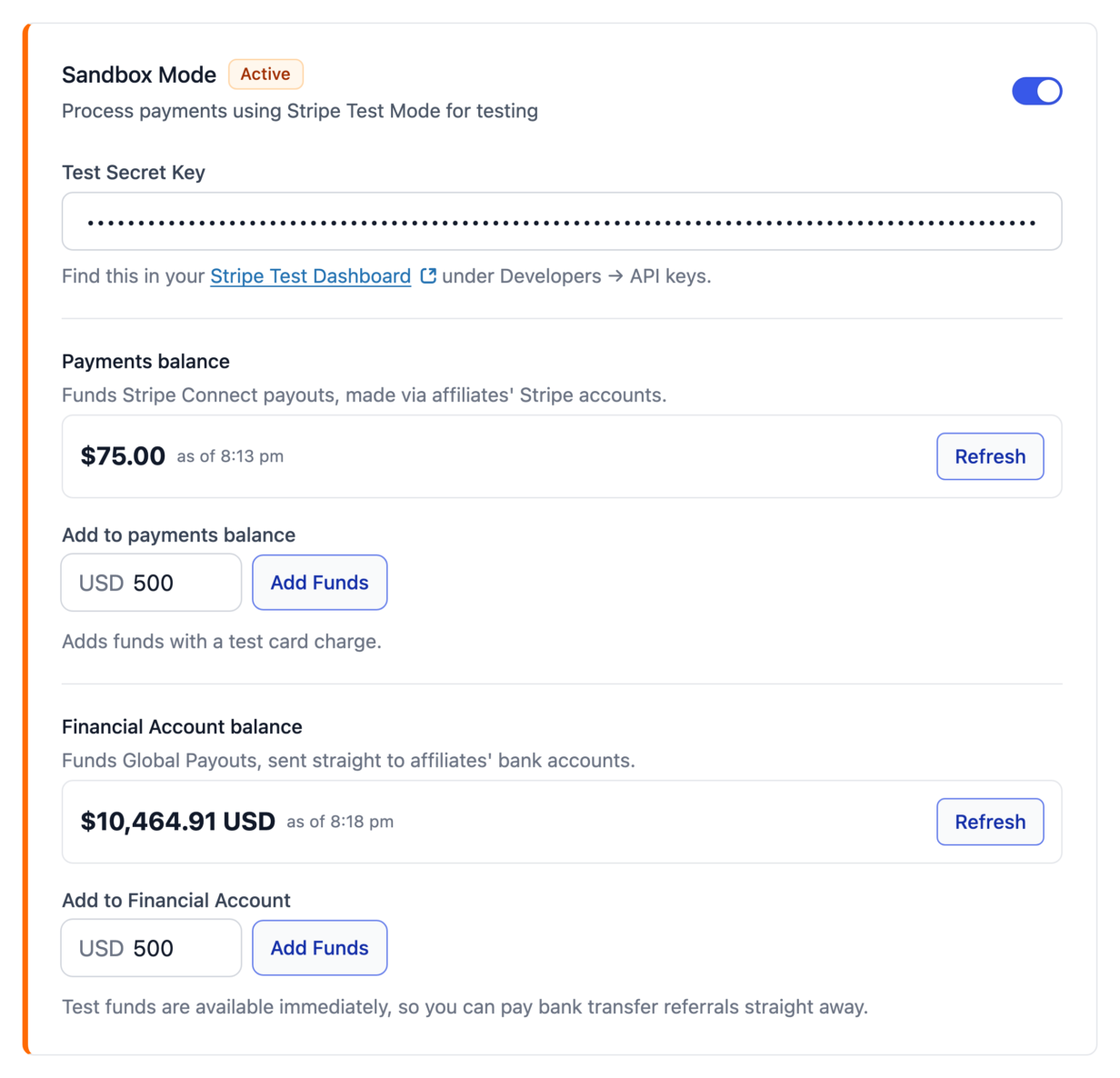
Your keys and your Financial Account are stored separately for each mode, so a sandbox setup never touches your live one. The on and off choices work differently: both modes share one setting. If the mode you switch to is not ready yet, the toggles lock but still show what you chose, and saving the page does not clear it.
How does AffiliateWP decide which option pays each affiliate?
AffiliateWP picks the option from the payout country each affiliate declares. Affiliates only ever see one method called Stripe, and never choose between the two themselves. The order is:
- An affiliate in the same country as your Stripe account, always: a Stripe Express account, whether or not you turn either option on. That payout does not cross a border, so Stripe charges no cross-border fee. For a US store paying a US affiliate, it is also what lets Stripe collect a W-9 and file the 1099.
- An affiliate abroad, in a country the bank option covers, with that option on: Straight to their bank account. When both options cover the country a new affiliate goes here, because the setup is shorter for them.
- An affiliate abroad, in a country only the other option covers, with that option on: Via their Stripe account.
- An affiliate in a country neither option reaches: another payout method you have turned on, such as PayPal, so they never start a Stripe setup that cannot finish.
Two rules keep affiliates who are already set up where they are:
- An affiliate who finished Via their Stripe account stays on it, even if their country would now go to the bank option.
- An affiliate who shows Ready to receive payouts on the bank option stays there until you turn that option off, or turn off the country group that covers them.
To see which option an affiliate is on, open their Edit Affiliate screen from AffiliateWP » Affiliates. The payout country field names the option above its description, for example Paid through Global Payouts or Stripe Connect (cross-border payouts).

How do I pay affiliates in countries Stripe does not cover?
If the country an affiliate chose is not covered by either option you have turned on, they do not see Stripe. AffiliateWP offers them another payout method you have enabled before they try to set Stripe up.
That other method is your site’s default payout method, as long as the default is not Stripe. Otherwise it is the first other method you have turned on, such as PayPal or store credit. Manual is always there as the last resort: the affiliate sees no payout option to fill in, and you pay them outside AffiliateWP and record it.
Turn on PayPal if you have affiliates outside Stripe’s reach. PayPal reaches countries neither Stripe option covers. Without a second method you would have to pay those affiliates by hand.
How affiliates set up their payouts
Your affiliates do the setup themselves, on one screen. They pick Stripe as their payout method and answer which country they receive payouts in, meaning the country of the bank account where the money lands. AffiliateWP then shows the setup for whichever option covers that country. The country list deliberately includes every country, so an affiliate gets a clear answer instead of starting a setup that cannot finish.
Setting up for the first time
If their country can be paid, they see Set up payouts.

On the bank option, the page tells them they will finish on a secure Stripe page, that no Stripe account is needed, and that payouts go straight to their bank in their local currency.
On the Stripe-account option, Stripe walks them through its checks and creates a Stripe Express account that pays out to their bank.
Part-way through setup
If they started and did not finish, they see Continue setup on the bank option, or Complete Setup on the Stripe-account option.
On the Stripe-account option, an affiliate who has not finished can use Choose a different country to start over.
Set up and getting paid
Once the bank option is ready they see Ready to receive payouts, the last four digits of the bank account, and Update bank details.

Affiliates who are already set up and getting paid do not need to do anything when you turn these options on.
When something blocks setup
If Stripe needs more information, they see Fix your setup.
If Stripe cannot reach their country, they see that Stripe is not available for payouts there, with a Switch to action for another method you have turned on.
Getting an affiliate to finish setup
To nudge someone who has not finished, open their Edit Affiliate screen from AffiliateWP » Affiliates. The reminder button there emails them a link to their own payout settings. Its label changes to reflect how far the affiliate has got and whether you have sent one already, so it is the same button either way.

Once the bank option is on, a Payout Setup Reminder email appears at AffiliateWP » Settings » Emails. Edit the wording there, or switch the email off.
Checking that a payout arrived
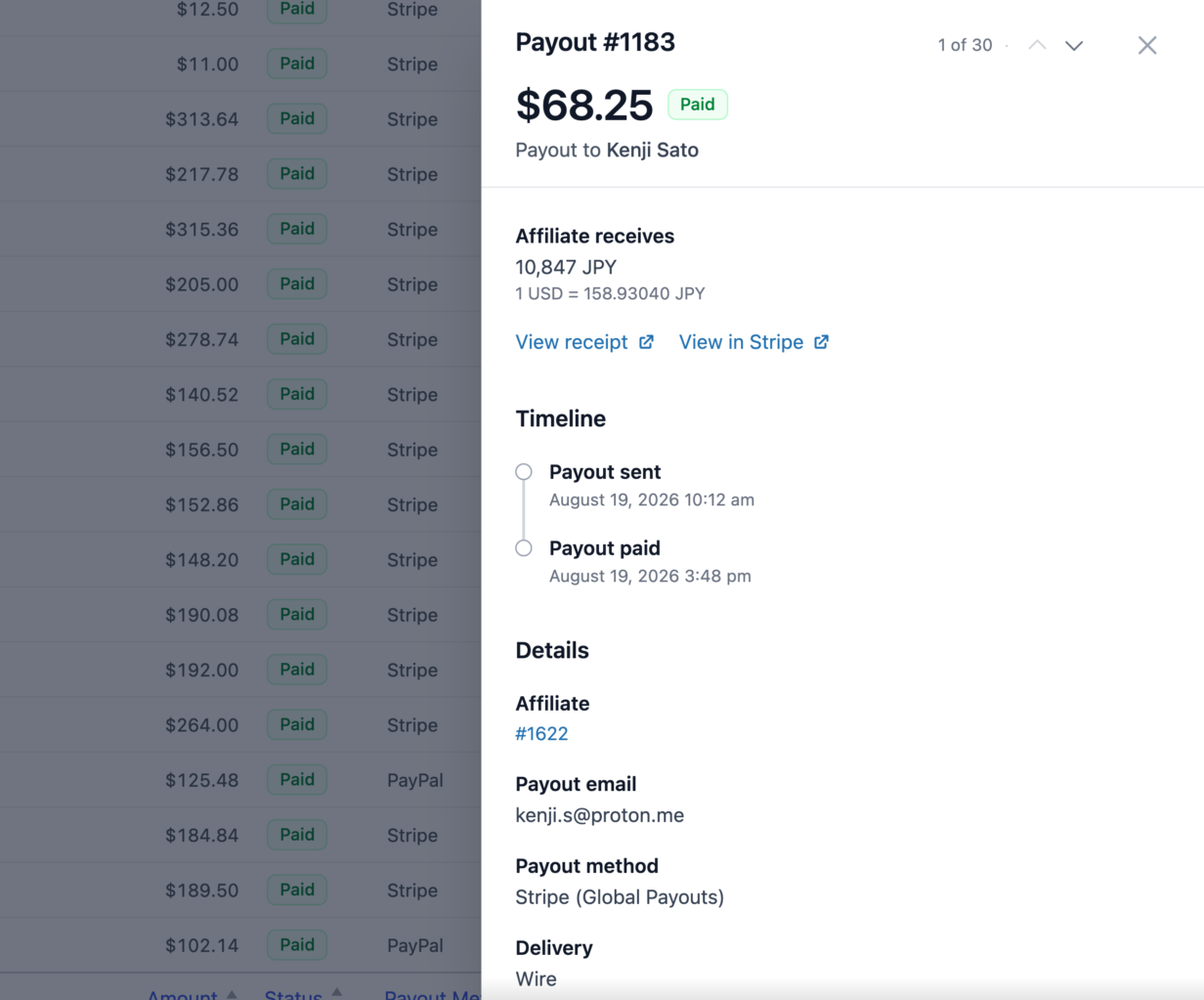
Open the payout at AffiliateWP » Payouts. On the bank option the payout records what actually happened at the bank, which answers most “where is my money” questions without leaving WordPress:
- What the affiliate’s bank was credited, in their currency, alongside the amount debited in your store currency, and the exchange rate Stripe used.
- How it was sent, shown as Standard for a local bank transfer or Wire.
- A timeline: Payout sent, then Payout paid. While it is still in flight the timeline ends with Expected arrival, and a payout that fails, returns, or is cancelled is stamped too.
- A Stripe receipt you can forward to an affiliate who asks for proof of payment.
- A link to the payment in Stripe, where the fees for that payout are itemised.
Why a payout can be too small to send
Stripe sets a minimum amount for each payout, in the destination currency, and it differs by country. Before AffiliateWP sends a payment it asks Stripe to price it, so the amount is checked against the current minimum for that affiliate’s bank country rather than a list that could go stale. If the payout is under the floor, AffiliateWP stops and tells you the minimum and its currency instead of sending something Stripe will reject.
If you hit this, either let that affiliate’s commissions build up, or raise the minimum earnings filter on the Pay Affiliates screen so small balances are not included in a run.
Changing an affiliate’s payout country
On the bank option, Stripe writes the country into the record it creates and never changes it. AffiliateWP therefore locks the payout country field once bank details exist, so WordPress and Stripe cannot end up disagreeing about where the affiliate banks.
To change it, open their Edit Affiliate screen from AffiliateWP » Affiliates and use Remove affiliate from Global Payouts. That clears the bank details on file, unlocks the country field, and lets the affiliate set up again with the right country. Nothing else about the affiliate or their earnings changes.

The lock also lifts on its own if the affiliate’s country stops being covered. That happens when you turn off one of the two country groups under the Straight to their bank account row, Local bank countries or Wire-only countries, and the affiliate is in the group you turned off. Their details stay on file, but they cannot be paid that way until you turn that group back on.
On the Stripe-account option, an affiliate who has not finished setup can fix this themselves with Choose a different country.
What happens to affiliates already set up if I turn an option off?
The two options do not behave the same way when you switch them off, so the detail matters.
Via their Stripe account. Turning this off only stops new international affiliates from setting it up. Affiliates who already finished keep getting paid, wherever they are. Affiliates in your own country can use Stripe whether this is on or off.
Straight to their bank account. Turning that row’s toggle off, or turning off either of the country groups beneath it, Local bank countries or Wire-only countries, means those affiliates can no longer be paid that way. AffiliateWP moves them to Via their Stripe account if it can pay their country, or to another payout method you have turned on. Until then they cannot be paid through Stripe, and the affiliate list and the pay-referral screen say so and link you back to the setting.
Turning either option off never deletes an affiliate’s Stripe account or bank details. It only changes who can use which option next.
Frequently asked questions
Do I need a special Stripe account to pay affiliates internationally?
No. Both options run on the Stripe account you already have. Via their Stripe account works from any of the eight sender countries listed in the comparison table. Straight to their bank account narrows that to the US and the UK, and needs Global Payouts active on the account so a Stripe Financial Account exists.
An affiliate’s country is not supported. Can they still use Stripe?
Yes, if Straight to their bank account is on and their country appears in the local bank or wire-only lists under Which countries can I pay affiliates in?. If neither option covers the country, turn on PayPal or another payout method, or pay them by hand.
I don’t see Global Payouts in my US or UK Stripe account. What do I do?
Activate it from your Stripe Dashboard. Stripe controls who is eligible, so if you cannot find it there, ask Stripe. AffiliateWP cannot enable it for you. Once it is active, return to AffiliateWP » Settings » Payouts and click Check now.
A toggle is greyed out. Why?
Usually your Stripe account is in a country that cannot use that option, or Stripe is not set up for the mode you are in. On the bank option, the toggle also stays locked until AffiliateWP finds a Financial Account.
I see the options even though my store isn’t in the US or UK. Is that right?
Yes. Eligibility follows your connected Stripe account’s country, not your store’s address.
Which option will a given affiliate use?
Open their Edit Affiliate screen from AffiliateWP » Affiliates. The payout country field names the option that will pay them. Change the country and the label updates before you save.
An affiliate says they received less than their commission. Why?
On Via their Stripe account, Stripe deducts its currency conversion fee from the amount the affiliate receives, and they only see it in their Stripe Express dashboard. On Straight to their bank account, open the payout at AffiliateWP » Payouts to see exactly what their bank was credited and the exchange rate used, and forward them the Stripe receipt.
An affiliate isn’t getting paid. What should I check?
Ask them to open their payout settings and click Continue setup or Fix your setup on the bank option, or Complete Setup on the Stripe-account option. You can email them that link with the reminder button on their Edit Affiliate screen. If you are paying through the bank option, also check that the Financial Account has enough money. AffiliateWP tells you the shortfall before a run.
Can I change an affiliate’s payout country after they’ve added bank details?
Not directly, because Stripe fixes the country when it creates the record. Open their Edit Affiliate screen from AffiliateWP » Affiliates, use Remove affiliate from Global Payouts, then have them set up again.
Next steps
- Stripe Payouts sets up Stripe and pays affiliates by direct transfer.
- A complete guide to paying your affiliates compares every payout method and explains how payouts work.
- PayPal Payouts covers affiliates neither Stripe option can reach.
- 1099 tax forms for affiliates explains the W-9 and 1099 flow for US affiliates paid through a Stripe Express account.
- Automatic Payouts pays everyone on a schedule, each through their own method.
That’s it! Your affiliates can be paid in their own currency through Stripe, either through a Stripe Express account or straight to their bank. If you have any questions, please don’t hesitate to contact our support team.